How to
How to convert PNG to SVG
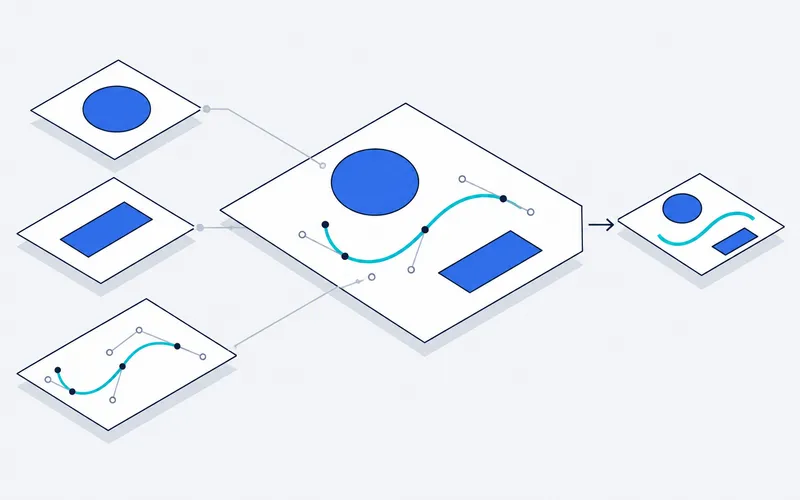
A PNG is a grid of pixels. Enlarge it and the edges turn blocky. An SVG describes the same picture as shapes and curves, so it stays sharp at any size and can be edited, recolored or cut. This converter traces your PNG into those shapes, right in your browser, and keeps its transparent background transparent.
- Choose your PNG. Drop it onto the box, pick one from your device, or paste a copied image. It is processed on your device and never uploaded.
- Pick the image type. Logo or clip art suits flat colors and clean edges. Photo keeps more shades. Black and white gives a single-color trace, ideal for stencils, vinyl and laser cutting.
- Adjust until it looks right. Fewer colors give a cleaner, smaller file. Raise the speck filter to drop noise and stray dots. Simplify curves smooths wobbly outlines.
- Download the SVG. Open it in Illustrator, Inkscape, Figma, Cricut Design Space or your laser software, or paste the code into a web page.
Which images convert well?
Tracing works best on images with clear shapes and a limited set of colors: logos, icons, signatures, line drawings, stamps and cartoons. Start from the largest, sharpest version you have: PNG exports from design apps and screenshots of icons trace especially cleanly, because PNG keeps every edge crisp.
Starting from a JPG or JPEG instead? Use the JPG to SVG converter, which cleans up compression artifacts and removes the solid background. To turn a photo or a sketch into poster-style or line art, use the image vectorizer and its presets.
Tip for cutting machines
Use Black and white with a speck filter of 8 or more. You get one clean layer with no tiny islands, which is what cutters and engravers want.
Why is my SVG file large?
Every separate patch of color becomes a shape. Gradients, textures and noise create thousands of them. Lower the maximum colors, raise the speck filter, or trace at a smaller size and the file shrinks, often by a factor of ten.
Does it keep transparency?
In the color modes, transparent areas of a PNG stay empty in the SVG, so a logo on a transparent background comes out without a background shape. In black and white mode, transparent areas count as white and only the dark shapes are traced. JPG files have no transparency, so their background is traced as a shape. The JPG to SVG converter removes it for you.
What powers the converter
Tracing is done by VTracer, an open source vectorization engine, compiled to WebAssembly so it runs at near native speed in the browser. See the About page for credits and licenses.