
Every image on a screen is one of two kinds. A raster image is a grid of colored pixels. A vector image is a set of shapes described by math. The difference decides whether a picture stays sharp when you enlarge it, how big its file is, and what you can do with it later. This guide shows the difference zoomed in, explains the file formats of each kind, tells you which to use for a logo, a photo, an icon or a print, and explains what changes when you turn one into the other.
The Difference in One Picture
Below is the same small logo twice, magnified eight times. On the left is a PNG, a raster file. On the right is an SVG, a vector file made from that PNG with our vectorizer. Look at the edge of the orange slice.
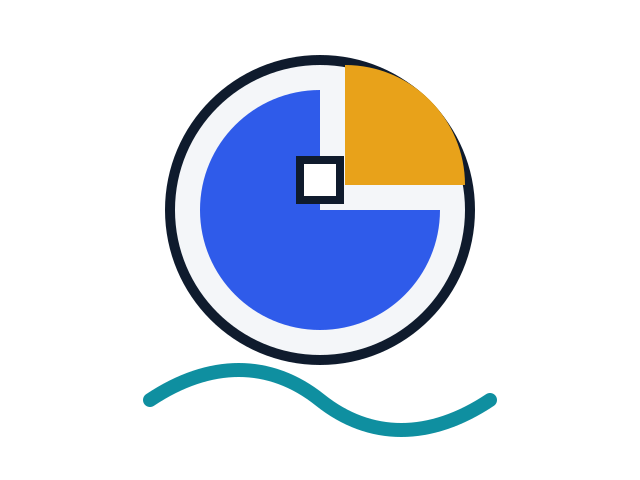
Before: the raster PNG, 640 by 480 pixels, at 8x
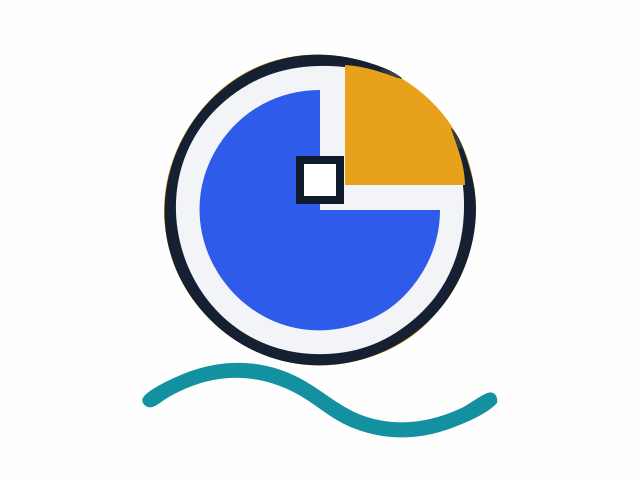
After: the vector SVG, 11 shapes, at 8x
The same corner of the logo, magnified eight times. The PNG shows its pixels as small squares. The SVG redraws the curve at the new size, so the edge stays smooth. It is not a perfect copy: the SVG has a thin dark sliver where the PNG has a clean ring, which is the loss the next sections describe. Sample logo made for this guide.
The raster version has only so many pixels, and when the browser enlarges it, each pixel becomes a bigger square, so curved edges turn into steps. The vector version has no pixels to run out of. It stores the curve as an instruction, and the screen draws that instruction fresh at whatever size you ask for.
What Raster Images Are
A raster image is a rectangular grid of tiny colored, usually square, pixels. Wikipedia explains that, unlike vector graphics, which use mathematical formulas to describe shapes and lines, raster images store the exact color of each pixel. That makes them ideal for photographs and images with complex colors and details.
Pixels and Resolution
A raster image is defined by its width and height in pixels. The logo above is 640 pixels wide and 480 pixels tall, which is 307,200 pixels. Every one of them has its own color value in the file. If you display the image at a size close to its own dimensions, it looks sharp. If you make it much larger, the software has to invent pixels between the ones it has, and the picture goes soft or blocky.
We did not cover print resolution here, because the requirements differ by printer and paper. If you are preparing a file for print, ask the print shop what size in pixels they need.
Why Photos Are Raster
A photo has millions of small changes in color: skin, sky, leaves, shadow. There are no clean shapes to describe. A grid of pixels is the natural way to record that, and it is what a camera sensor produces.
Common Raster Formats
Wikipedia lists JPEG, PNG, APNG, GIF, WebP and BMP as common raster formats, and TIFF is one too. They differ in how they compress the pixels. MDN says PNG is preferred over JPEG for more precise reproduction of source images or when transparency is needed, and JPEG is a good choice for lossy compression of still images. Lossy means the file is made smaller by throwing away some detail. Lossless, like PNG, keeps every pixel.
What Vector Images Are
Vector graphics are images created directly from geometric shapes such as points, lines, curves and polygons, according to Wikipedia. Instead of recording the color of every pixel, the file records the shapes: where each point is, how the curve bends, which color fills it.
Shapes and Paths
An SVG file is a text file. Here is one real shape from the SVG in the example above, a dark square in the middle of the logo:
<path d="M296,204c0-16,0-32,0-48c16,0,32,0,48,0c0,16,0,32,0,48c-16,0-32,0-48,0Z" fill="#0F1B2D"/>Read the path as directions for a pen. Start at the point 296, 204. Draw up 48, then across 48, then down 48, then back, and fill the result with dark navy. That is 48 units on each side, whatever size you display it at. MDN describes SVG as a text-based, open web standard for describing images that can be rendered cleanly at any size, and says it works with CSS, the DOM and JavaScript.
Scaling Without Loss
Because a vector image is a set of instructions, you can resize it freely. Make it the size of a stamp or a billboard, and the software redraws the same shapes at the new size, with smooth edges. That is what the S in SVG, Scalable, is about. MDN says SVG files are ideal for diagrams, icons and other images that can be accurately drawn at any size.
Limits of Vector
Vector works when a picture is made of a manageable number of clean shapes. A photograph is not, so a vector version of a photo needs thousands of tiny shapes, or it becomes a simplified poster. We show both cases below.
Vector vs Raster Examples
Here are everyday images, sorted by the kind that fits them best.
- A holiday photo: raster. It is a camera capture, made of pixels from the start.
- A company logo: vector for the master file, with PNG copies for places that need them.
- A screenshot of an app: raster, because it records the pixels on your screen.
- A chart exported from a graphing tool: vector if you export SVG, raster if you export PNG. Either is the same picture, drawn two ways.
- A hand-drawn sketch you photographed: raster. It can be traced into vector shapes, but the result is a redraw.
- A scanned page: raster. Text on a scan is only pixels until software reads it.
If a file could be either, ask what you will do with it. If you will enlarge, recolor or cut it, you want vector. If you will retouch, crop or share a photograph, you want raster.
How to Tell Which One You Have
- Look at the extension. .svg, .ai and .eps are usually vector. .jpg, .png, .gif, .webp and .tif are raster.
- Zoom in. Enlarge the image a lot on screen. If squares appear at the edges, it is raster. If the edges stay smooth, it is vector.
- Open it in a text editor. An SVG opens as readable text with words like path and fill. A raster file opens as unreadable symbols.
File Formats by Type
| Kind | Common formats | Best for |
|---|---|---|
| Raster | JPEG, PNG, GIF, WebP, BMP, TIFF | Photos, screenshots, images with many colors |
| Vector | SVG, AI, EPS, PDF, CDR, WMF | Logos, icons, diagrams, illustrations |
The vector formats in the table come from Wikipedia’s list of common vector types, and it adds that the W3C standard for vector graphics is SVG. One caution about PDF and EPS: they are often vector, but they can also contain raster images, so a PDF is not automatically a vector file.
Is PNG a Vector File?
No. The W3C specification calls PNG an extensible file format for the lossless, portable, well-compressed storage of raster images. Lossless describes the compression, not the kind of image. A PNG is still a grid of pixels.
Is SVG Vector or Raster?
SVG is vector, but a little more complicated than that. The W3C says SVG allows three types of graphic objects: vector graphic shapes, images and text. So an SVG can carry a raster image inside it. When people say “an SVG logo”, they mean one made of shapes.
Which One to Use
| What you are making | Use | Why |
|---|---|---|
| A logo | Vector, plus a PNG copy | Sharp at every size, and easy to recolor |
| A photograph | Raster (JPEG or PNG) | Millions of color changes |
| An icon or diagram | Vector (SVG) | Drawn accurately at any size, as MDN’s guide says |
| A screenshot | Raster (PNG) | A screenshot is made of pixels already |
| An image for a cutting machine | Vector (SVG) | Cutters follow outlines |
Logos
Keep the master of a logo as a vector so that it stays sharp on a business card and on a banner. Also keep PNG copies at the sizes you use most, for places that do not accept SVG.
Photos
Keep photos as JPEG or PNG. Turning a photo into a vector does not give you the original back, which we show in the next section.
Icons, Diagrams and Charts
These are made of lines and flat colors, so SVG is a natural fit. All the charts you make in our tools can be downloaded as a clean SVG or as a PNG.
Cutting Machines
Cutting machines follow outlines, so they generally want vector files. Cricut’s Design Space help page, for example, says .svg and .dxf files are vector images that upload as designed, while .jpg, .bmp, .png and .gif files are basic, raster images that are uploaded as a single layer. We only read Cricut’s page, so check your own machine’s help page for its rules.
What Changes When You Vectorize an Image
Converting a raster image into a vector image is called vectorizing or tracing. Software finds the edges and color areas in the pixels and draws shapes over them. Wikipedia notes that in both directions, raster to vector and vector to raster, some information is lost, although certain vectorization operations can recreate salient information, as in optical character recognition.
In practice, vectorizing a clean logo works well, because a logo was a set of shapes to begin with. Vectorizing a photo gives you an artistic simplification, not a copy.
A Logo Stays a Logo
The zoomed example in the first section is a clean logo. Our vectorizer turned it into 11 shapes. It uses VTracer, an open-source converter that, its authors say, produces output that is more compact than Illustrator’s Image Trace. That comparison is the authors’ claim, not ours.
Photos and Gradients Become Poster Art
Here is a landscape picture with soft gradients in the sky and on the water, and the SVG our vectorizer made from it with the photo-to-poster setting. It is an illustration we made for this guide, not a camera photo, but its smooth color changes show what tracing does to a photo.

Before: a 1200 by 800 pixel JPG landscape

After: poster-style SVG, 21 shapes
The traced version is simplified into flat color areas. The gradients in the sky and the light on the water are reduced to a few shapes, so this is poster art and not a copy. Sample illustration made for this guide, not a camera photo.
Use vectorizing on a photo when you want that look, for example to print a stylized version or cut layers. Do not use it when you need the exact photo.
File Size: What We Measured
We measured three of our own sample files with the wc -c command on 29 September 2026. This is a small test, not a rule.
| Sample | Raster file | Vector file made with our vectorizer |
|---|---|---|
| Flat logo, 640 by 480 | PNG, 21,295 bytes | SVG, 2,696 bytes, 11 shapes |
| Logo with JPEG noise, 480 by 360 | JPG, 7,192 bytes | SVG, 5,283 bytes, 12 shapes |
| Landscape illustration with gradients, 1200 by 800 | JPG, 23,266 bytes | SVG, 9,772 bytes, 21 shapes |
In these samples the vector file was smaller every time, but do not take that as a law. An SVG grows with the number of shapes it needs, and a detailed photo traced with many colors can be larger than the original. Test your own file.
How to Convert Between Vector and Raster
Raster to vector (vectorizing). Use a tracing tool. Ours run in your browser: nothing is uploaded, and the converter is fast on a typical logo. If you are not sure which one fits your file, drop it on the SVG converter: it checks the format, the transparency and how many colors the picture has, then opens the matching tool with your image loaded. The vectorize image tool has presets for logos, line art and photos. The PNG to SVG converter is tuned for PNG files with transparent backgrounds, and the JPG to SVG converter smooths JPEG artifacts and removes a flat background.
Vector to raster (rasterizing). Export the vector as PNG or JPEG at the pixel size you need. Do it once, at the largest size you will use. Our chart makers export PNG at 1x, 2x or 3x as well as a clean SVG.
If you are deciding which format to use for a specific job, read our comparison of SVG vs PNG.
Summary
Raster images are grids of pixels and are best for photographs. Vector images are shapes described by instructions and are best for logos, icons and diagrams. PNG, JPEG, GIF, WebP and TIFF are raster. SVG is the standard vector format for the web, and AI, EPS and PDF are common vector files for design and print. Converting in either direction loses some information, so keep the vector master of anything you might need to enlarge.
Questions people ask
Is a JPEG a raster or vector?
A JPEG is a raster image: a grid of colored pixels. It is also stored with lossy compression, which shrinks the file by discarding some detail, so it suits photos but blurs and shows noise around sharp edges when enlarged. A JPEG is not a vector file, even when a program lets you scale it.
Is a .PNG a vector file?
No. The W3C describes PNG as a format for lossless storage of raster images, which means a grid of pixels. Lossless refers to compression that keeps every pixel exactly. To get a vector version of a PNG you have to trace it into shapes, and some detail is lost in the process.
Is SVG a vector or raster?
SVG is a vector format. The W3C says it describes two-dimensional graphics with vector shapes, meaning paths of straight lines and curves, and it can also hold text and images. An SVG file can therefore contain a raster picture inside it, but a normal logo or icon SVG is made of shapes only.
Is a TIFF file a raster or vector file?
TIFF is a raster format. Wikipedia describes it as an image file format for storing raster graphics, popular with graphic artists, publishers and photographers. It is often used for high quality scans and photos. If you need a vector file for a logo, look for SVG, AI, EPS or PDF instead.
Which is better, raster or vector?
Neither is better everywhere. Raster is the right choice for photographs, which have millions of small color changes. Vector is the right choice for logos, icons and diagrams, which are made of clean shapes and need to stay sharp at any size. Pick by the kind of image, then by where it will be used.
